Live dashboard
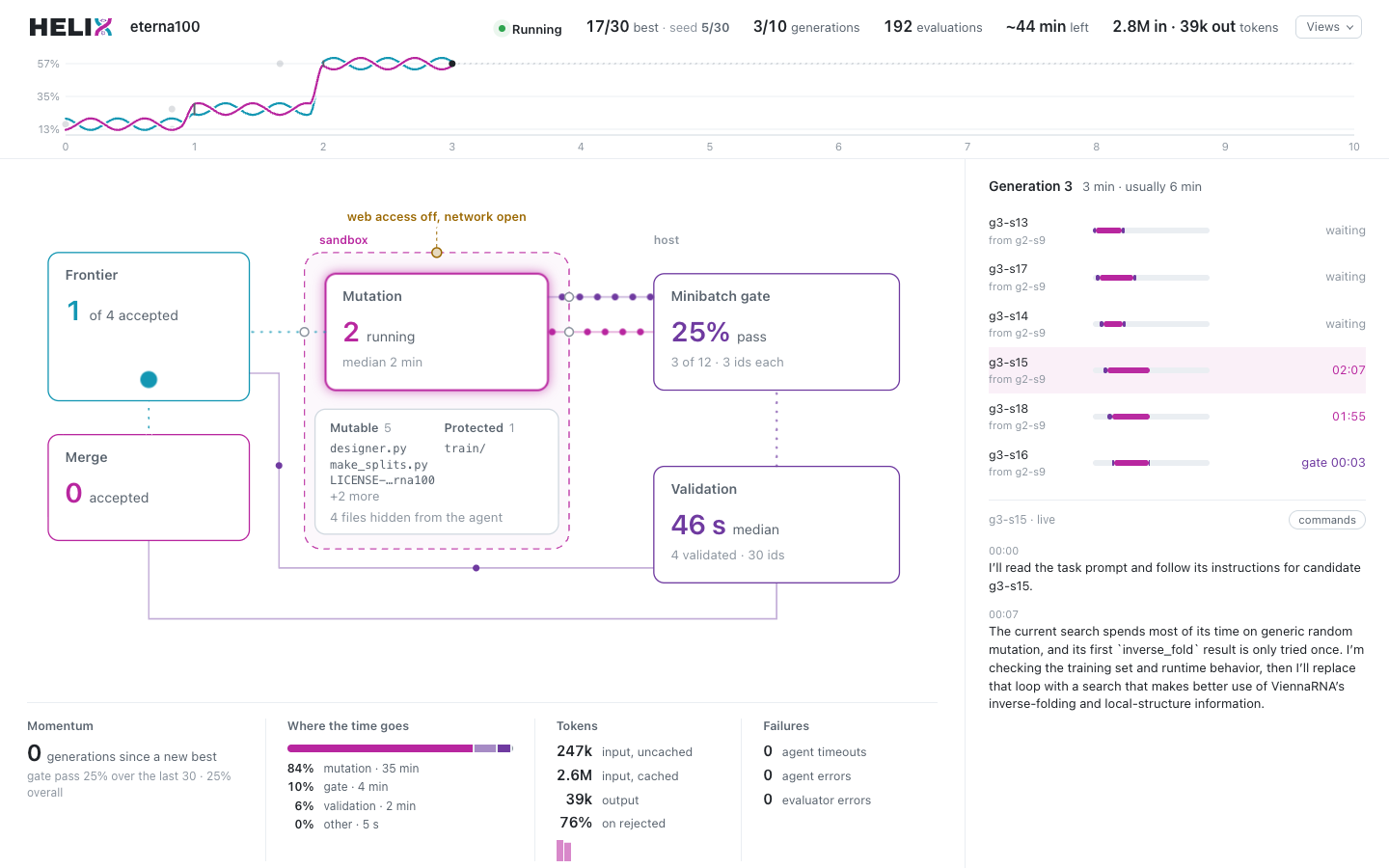
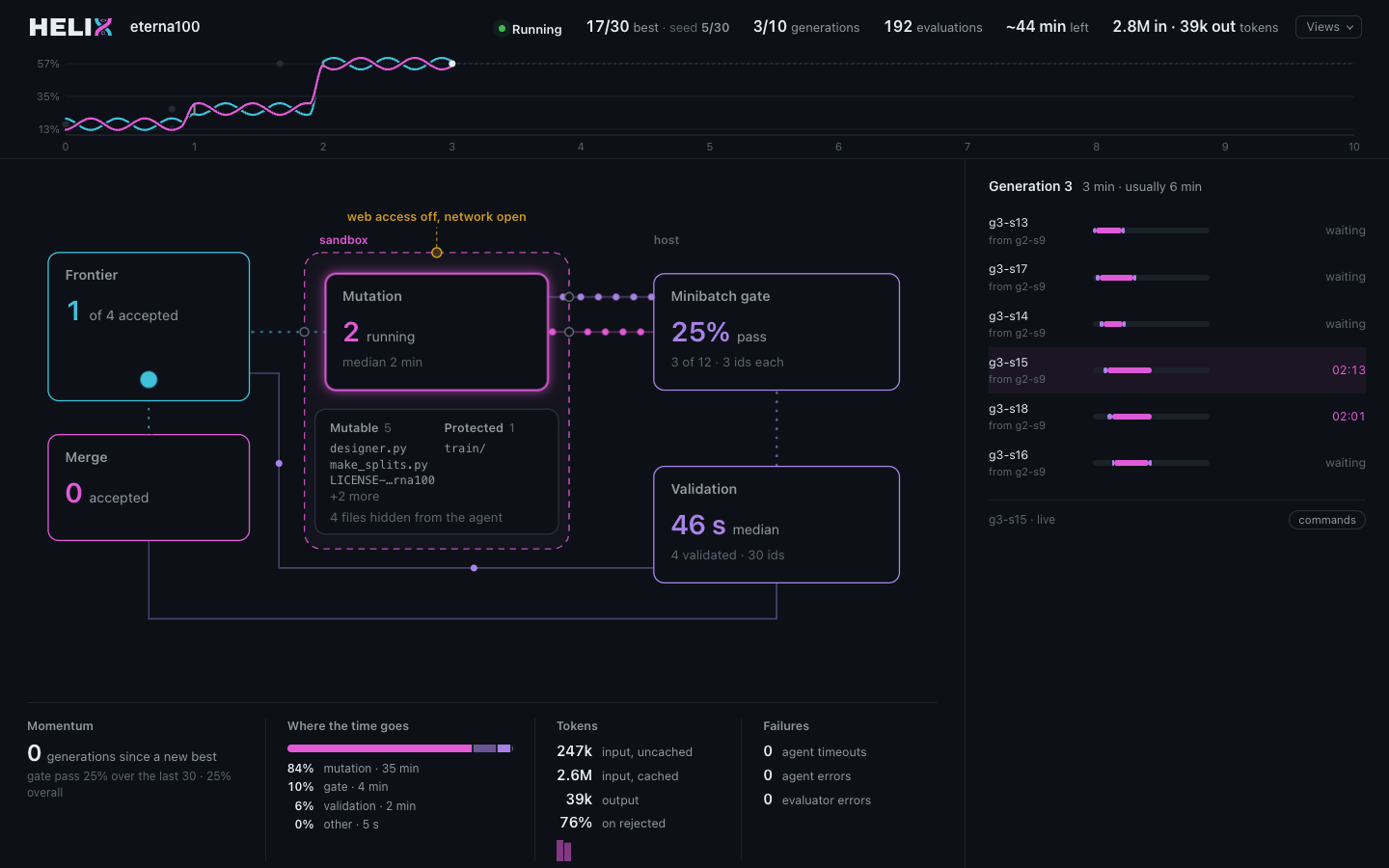
helix ui opens a read-only dashboard of a project in your browser. Before a run it shows the configured loop and where
each part runs; during and after a run it shows progress, the frontier, the lineage of every proposal, a table of all
proposals, every candidate, the current generation with the agent's live transcript, and run health. It reads
helix.toml and .helix/, the same files helix log, helix frontier and helix timing read, and never writes to
them.
$ helix ui
HELIX UI for my-project: http://127.0.0.1:8790/#token=Ux3kQ9vN2pLm7RtA5yWc8dEf1HgJ4sZb
Read-only. Press Ctrl+C to stop.
Options
--dir PATH        Project directory containing helix.toml (default: .)
--config PATH     Path to the config file (default: helix.toml)
--port INT        Port to listen on (default: 8790; the next 10 are tried when it is taken)
--host HOST       Interface to listen on (default: 127.0.0.1)
--no-browser      Print the address without opening a browser
A run on another machine
Start the dashboard where the run is and forward its port:
ssh my-server 'cd ~/my-project && helix ui --no-browser'
ssh -N -L 8790:127.0.0.1:8790 my-server
Then open the printed address on your machine. Keep --host at its default: the dashboard serves validation scores and
evaluator feedback, and anything other than loopback exposes them to the network.
Views
The Views menu at the top right switches between the Loop, Frontier, Lineage, Path and Proposals. With the menu open, the
arrow keys, Home and End move through it and Escape closes it; Down on the Views button opens it. Elsewhere, Escape
closes the open popover or panel, and otherwise returns to the Loop. Each view has its own address, such as
#proposals/rejected, #lineage/g12-s3, #path/g12-s3 or #candidate/g12-s3, so a link to it opens that view.
What it shows
- Header: run state, the best validation score (successes out of n when every score is 0 or 1) with the seed's score
beside it, generations, evaluations against
max_evaluations, time left from whichever limit binds first, and spend, with the projected total at the end while the run is going. With anobjective,hybridorcartesianfrontier the best of each objective takes the place of the single score: the first three are shown, and hovering or clicking them lists every objective with the candidate that holds its best and the seed's value. Codex reports no cost, so a Codex run shows tokens instead. Click the project name for the config hash,frontier_type,rng_seed, agent, evaluator command and sandbox. - Progress: the best validation score by generation, drawn as a helix around it, with a rung at each new best and a dot for every accepted candidate. Hover for the generation and the candidate that held the best. On a run with objectives, a selector on the chart switches the line from the aggregate to one objective's best so far; the browser remembers the choice. Click the chart's background to open the Lineage.
- Loop: frontier, mutation, minibatch gate and validation, each with one live number, and merge when
evolution.merge_enabledis on. Without a train set (no[dataset]orseedless.train_path) the gate scores the single task once per proposal. The frontier box shows each member as a dot, shaded by score, and is as tall as its members need, up to a limit; past 200 members it shows the 200 best and counts the rest. Under mutation, a card lists what the agent may change (Mutable) and what it must not (Protected), with the first few of each, and how many files the sandbox hides from it; click it for the full lists. Dots carry data and dashes carry decisions along the arrows, at the speed of the run's own median durations, during the run and after it. The arrow into the gate carries one dot per proposal of a generation and the arrow back to the frontier one per proposal that passes the gate (at most six), so the gate's filtering shows as a thinner flow; the arrow from the gate back into mutation carries the parent's minibatch scores and the evaluator's feedback, which go into the agent's task prompt. Hover an arrow for what it carries and the time it moves at. They stand still when the system asks for reduced motion. The sandbox is drawn when the agent runs in Docker; the evaluator sits outside it unless it runs in a sidecar. Amber marks only settings that are likely mistakes, such asagent.web_access = falsewith an open network. Click the gate for the rejected proposals. - Frontier (click the box): the non-dominated candidates (GEPA's
remove_dominated_programsover the frontier keys), their mean score against the keys they hold, and a strip of the best score on every validation instance. Click a cell of the strip for that instance's score in every accepted candidate. With anobjective,hybridorcartesianfrontier it shows a table of objective means and a plot of one objective against another. Candidates with the same score on every key keep one place on the frontier between them, as in GEPA, so the candidate with the best score can be listed as dominated. - Lineage: every proposal by generation, joined to its parents, with the path to the best candidate in cyan and
frontier members ringed. Height has no meaning. Among siblings the one with the most descendants sits in the middle,
so a parent's most productive line runs on from it, and the others alternate above and below; proposals that branch
off a line which continues past them sit a row below it, so nothing reads as part of the path to the best. Rejected
proposals are small open dots; three or more rejected from one parent in one generation are one circle with their
count, whose panel lists them (a toggle hides rejected proposals altogether). Hover a node to light its ancestors and
descendants and fade the rest. Click it to pin it and open its panel: generation and parents, score (labelled
valorgate), outcome and reason, objective values, the change summary, how many descendants it has and how many of them were accepted, and its children. Double-click a node, or use "Open candidate", to open it, or "Path from seed" for its ancestry. While a node is pinned, Left moves to its parent, Right to its best child, and Up and Down to its neighbours in the same generation; Escape unpins it. Hovering and pinning never move the tree; only opening a group of rejected proposals (from its panel, or by pinning one of its members) or the toggle changes the layout. When the generations no longer fit across, the tree scrolls sideways and a strip above it shows the whole run, the path to the best and the part in view; click or drag the strip to move.#lineage/<id>opens the view with that node pinned. - Path: the best candidate's ancestry from the seed, one step per accepted ancestor: its score and the change
against the step before, the change summary, files changed, agent time and tokens or cost, and how many proposals
from the same parent in that generation it took (for example "1 of 6 proposals from g0-s0 accepted"). Gaps of
generations with no accepted child on the line are marked. At a merge it follows the parent on the path to the best.
#path/<id>shows the path to any accepted candidate. - Proposals: one row per proposal in
helix logorder, including perfect-score skips, failed proposals and the ones still running. Filter by outcome (frontier, dominated, rejected, skipped, failed, running) and sort by generation, score, Δ parent or cost. A score labelledvalis an accepted candidate's validation mean; one labelledgateis where a rejected proposal stopped, on the minibatch or the val stage (for a skip, the parent's minibatch score). Δ parent compares validation means, so only accepted candidates have one. The cost column (tokens for Codex) appears when the run hasusagerecords. Up, Down, Home and End move the selection, and Enter opens it. - Candidate (click any dot, rung or row): its generation and parents, score, frontier rank and objective means, and
how many validation instances it solved (
improvedwhen scores are not 0 or 1) or regressed against its parent. Then its worktree and commit, the files changed and the diff against its parent, or against the seed with thevs seedswitch; the agent's change summary; its time in mutation, gate and validation and what it cost (tokens for Codex); its children with their outcome and score; and, under Task prompt, the prompt the mutation agent was given. An open candidate page updates when the proposal finishes, and a frontier member's rank and keys update as the frontier changes. A rejected candidate also shows why and where it stopped. - Instances (on the Candidate): every scored instance, in three tabs. Changed holds the instances whose score
differs from the parent's, improved first; the solved and regressed counts open it in that direction. All keeps
the evaluation order and Lowest puts the lowest first. Click a row for the evaluator's side information on that
instance for the candidate and its parent, and the instance's score in every accepted candidate. When the instance ids
fall into two or more families (the text before
group_key_separator), a Families table compares the candidate with its parent per family, and a click on a family filters the instances to it. A rejected candidate's instances are its gate scores, labelledgate. - Mutation and Validation (click the box): the agent's time by tool, and the evaluator's command, sizes, errors and
the time of each
helix.timedname it reports. - Files (in the Mutation view): what the agent cannot see, can see but must not change, and may change. Hidden is what
the sandbox leaves out of the agent's workspace copy:
sandbox.omit_from_agent, and alwayshelix.toml,.envfiles and.git(nothing without the sandbox). Protected is HELIX's protected set, the evaluator script in the command plusevaluator.protected_files: a candidate that changes one is rejected before it is scored. Mutable is every other file HELIX snapshots into the seed. A candidate's diff marks any protected file it changed, and a proposal rejected for changing one lists those files on its page. - Run health: generations since a new best and the gate pass rate, where the time goes, spend, and failures (agent
timeouts, agent errors, evaluator errors; click a count for the failed proposals). Spend is the cost so far and a
projected cost at the end while the run is going, and the total and cost per generation once it has stopped. A run that writes
usagerecords to.helix/timing.jsonlalso shows a bar of cost per generation and the share spent on proposals that were rejected or failed, and projects from the median cost of a finished generation; an older run projects from the run total divided by the generations so far. Codex reports no cost, so a Codex run shows the bars and the share in tokens, with no projection, and splits its tokens the way OpenAI prices them: uncached input, cached input, and output (which includes reasoning). Codex counts cached input inside its input total; the dashboard subtracts it, so the three rows add up to the run's tokens. - Current generation: each proposal's phase and elapsed time, and the live transcript of the selected agent.
Lineage and Path
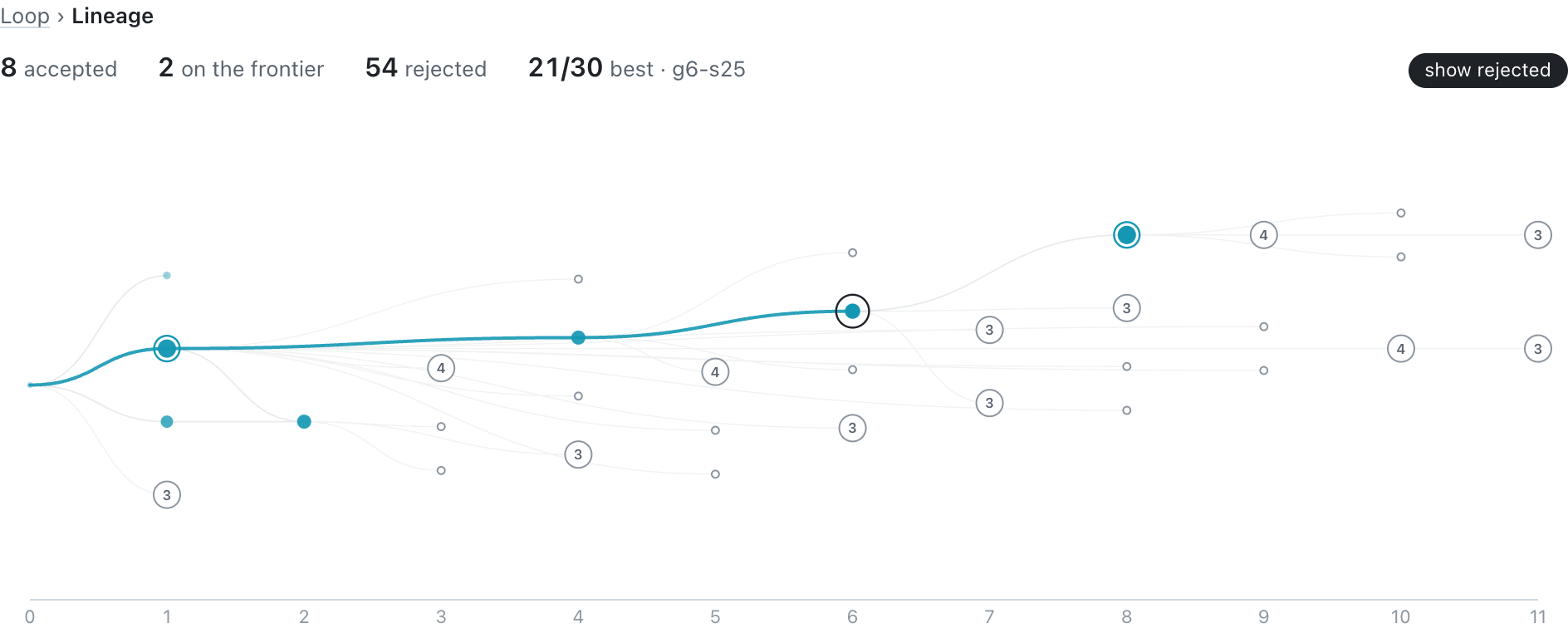
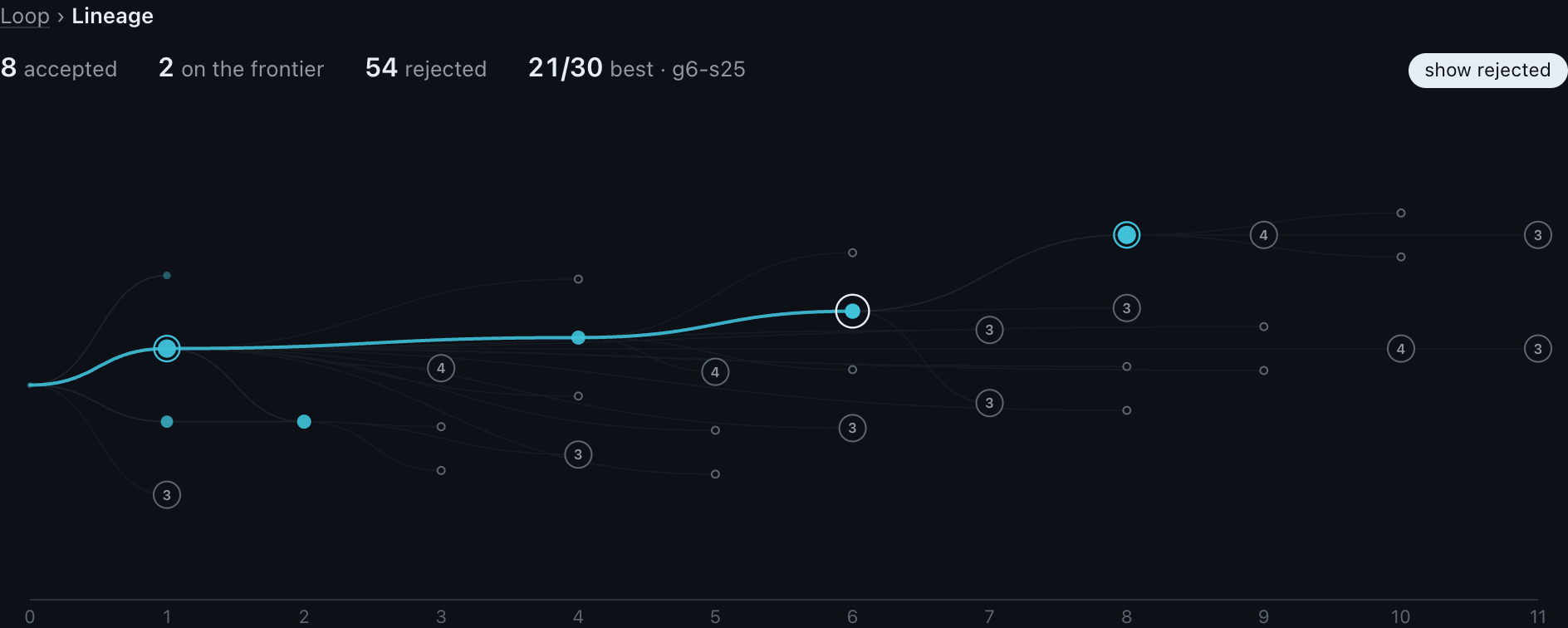
Views → Lineage. Hover a node to light its ancestry; click a counted circle to list the rejected proposals in it.
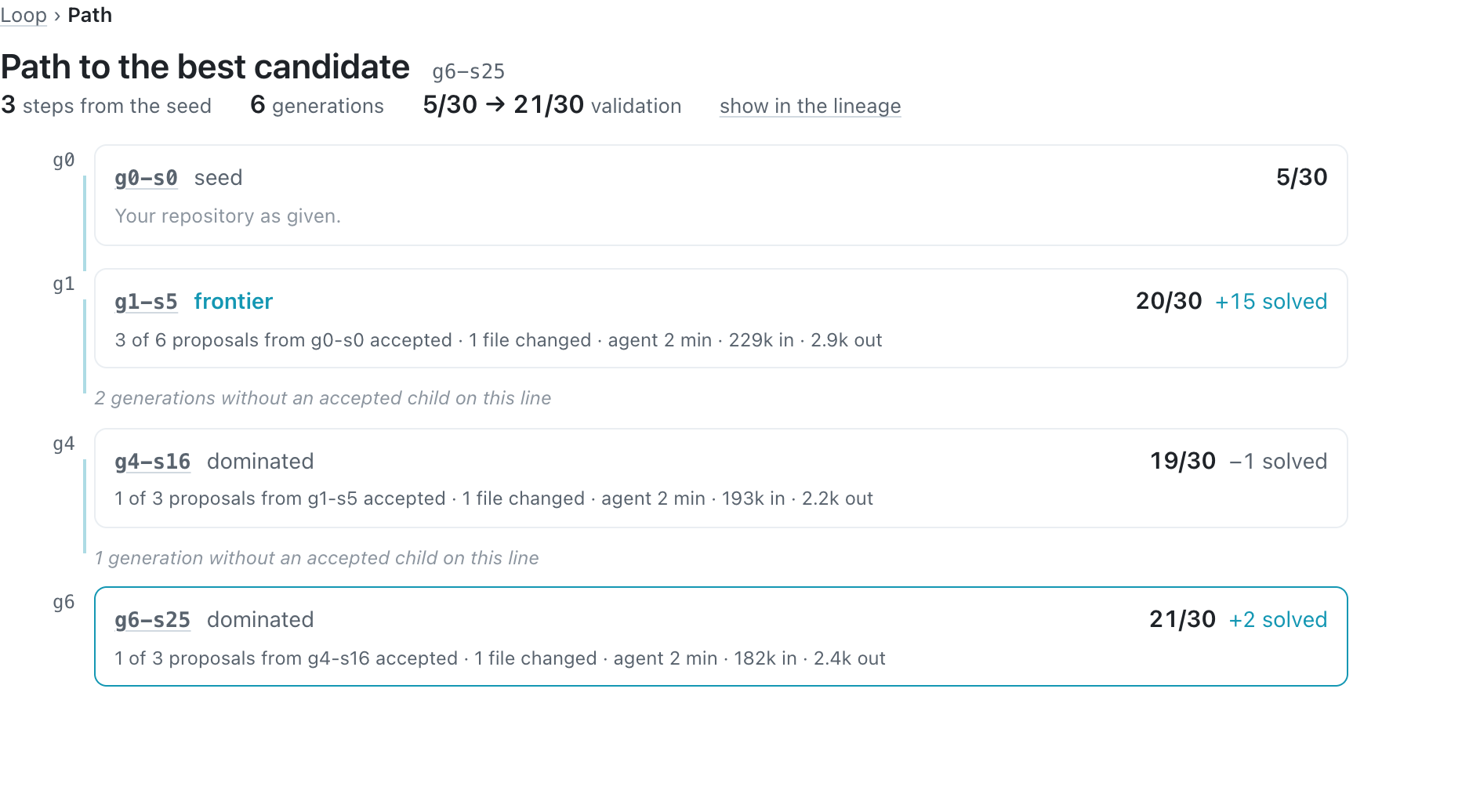
Views → Path, or "Path from seed" on a pinned candidate in the Lineage.
Screenshots from November 2026; scripts/docs_screenshots.py regenerates them from a running dashboard.
Live transcripts
The transcript comes from the agent CLI's own session file, which Codex and Claude Code write as they run. With the
Docker sandbox on, that file is in the run's login volume, so the dashboard reads it with a short-lived container that
mounts the volume read-only and has no network, at most once every 4 seconds and only while the transcript is on
screen. HELIX records each agent call's session id in .helix/timing.jsonl (a session record): it picks Claude
Code's (--session-id) and reads Codex's from the first line Codex prints. The session file is named after that id, so a
live session is matched to its own agent exactly, however many agents run at once
(num_parallel_proposals × mutations_per_parent), and the agent is told nothing about its candidate. Runs made
with a HELIX that recorded no session ids fall back to start order once all their sessions are 20 seconds old:
parallel agents that start within the same second can then show each other's live transcript until they finish, and
the panel says "session matched to this agent by start time". After a call ends the dashboard shows the copy HELIX
keeps in the candidate's worktree; rejected candidates' worktrees are removed, and their transcripts with them. Transcripts are shown for the codex and claude
backends, whichever one the agent ran with (helix evolve --backend included); other backends show none. With
evolution.sibling_history on, the change-summary call's transcript follows the mutation's while it runs. A transcript record larger than 1 MiB is skipped so subsequent events can still
appear.
Safety
- The dashboard only reads: it never writes to the project,
.helix/, worktrees, git refs or Docker volumes, and it never reads credential files. - The dashboard masks known token formats and secret-like assignments in evaluator commands, transcripts, diffs and feedback. Environment variables in the configuration summary are shown by name only.
- The page and its static assets are public. All run data requires the token from the printed address. The browser
removes the token from the URL and keeps it for the current tab and origin. Data requests, including live updates,
send it in an
Authorization: Bearerheader.
Limits
- HELIX writes no "finished" marker other than the end of the run's timing span, so a run killed with
SIGKILLlooks like it is still running. The dashboard marks a run that has written nothing for a long time as "Running?". - Tokens and cost are added to the run's budget when an agent call ends, so spend lags the live transcript.
- A run older than the
usagerecords has no per-generation bars, no cost per proposal and no share on rejected work. The Candidate view then takes the cost from the backend's result files in the worktree, which go with a rejected candidate's worktree. - The parent's score on the minibatch gate is not saved, so a rejected proposal shows the child's score only.
- Settings come from
helix.toml. HELIX does not record command-line overrides such ashelix evolve --generations, so once a run passes the file'smax_generationsthe header shows the generation without a total and no time left from it.